Records Management Beyond Spreadsheets
Still Tracking Law Firm Records in Excel?
Spreadsheets can be useful for maintaining a basic inventory. But as your firm's records grow, tracking file movement, locations, retention dates, legal holds, and disposition manually becomes increasingly difficult. FastTrack gives law firms a centralized records-management system built specifically for those workflows.
When Does a Spreadsheet Stop Being Enough?
A Spreadsheet Can Work Well When...
- — Record volume is small
- — Few employees handle records
- — Records rarely move
- — Retention is simple
- — Only one location is involved
Complexity Increases When...
- — Hundreds or thousands of records need tracking
- — Files move between staff and locations
- — Multiple offices or storage facilities are involved
- — Multiple users update the inventory
- — Retention and legal holds need consistent documentation
A Spreadsheet Row Tells You What's on the List
A spreadsheet row might contain:
That works, until the file moves. Then someone has to:
- Know that the file moved
- Remember to update the spreadsheet
- Enter the correct new location
- Preserve the old location somewhere else, if history matters
- Make sure another user doesn't overwrite or duplicate that entry
FastTrack is designed to make that movement part of the records-management workflow itself — the location update and the history are the same step, not two separate ones.
A Structure, Not a Column
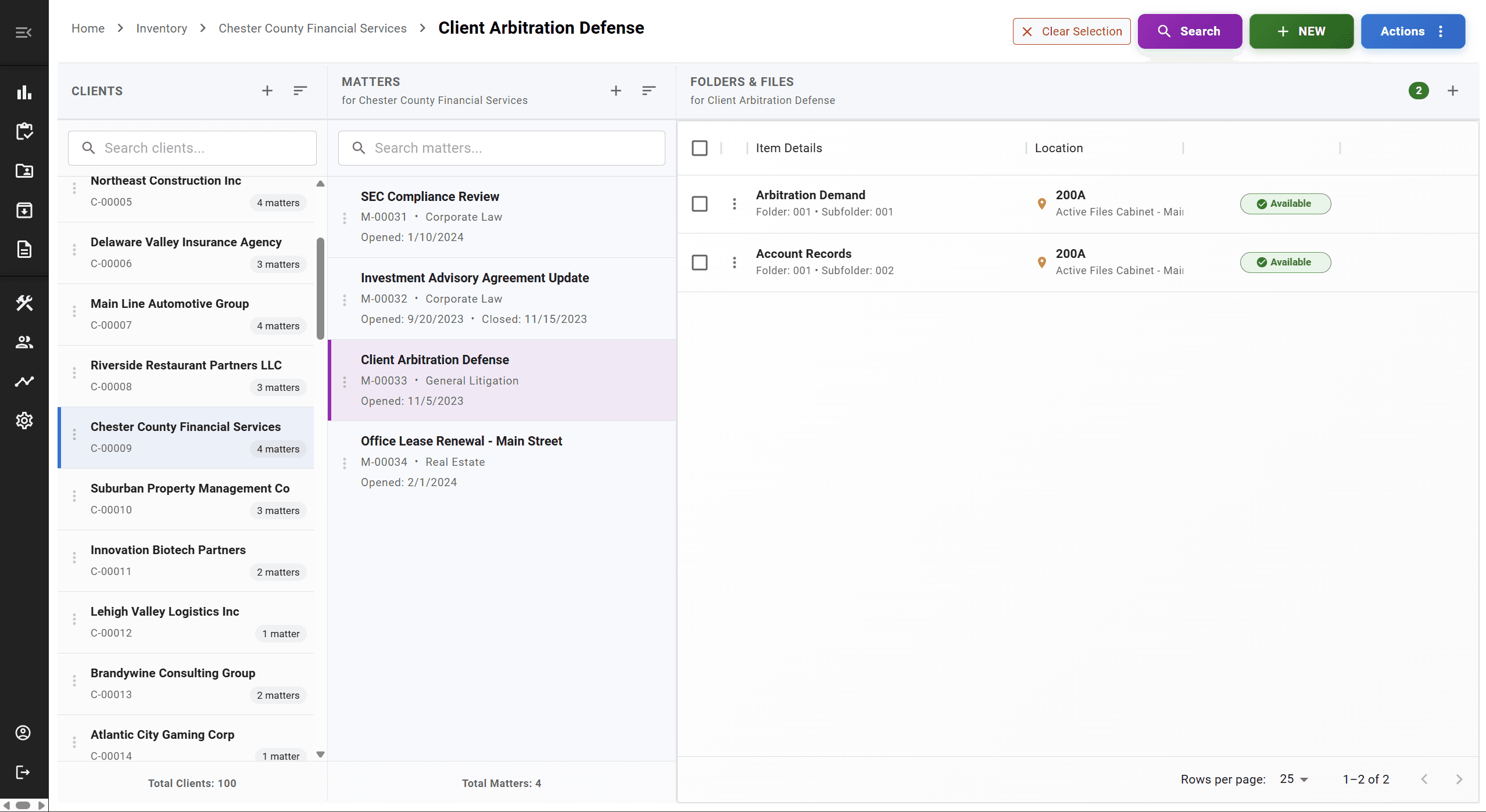
Client → Matter → Folder → Record
Instead of relying on naming conventions or a "Matter" column to keep records organized, FastTrack structures every record around the client and matter it belongs to. Knowing where a file is today is useful. Knowing where it's been, and having that organized the way your firm actually works, is what records management adds beyond a list.
Retention Tracking, Without the Extra Columns
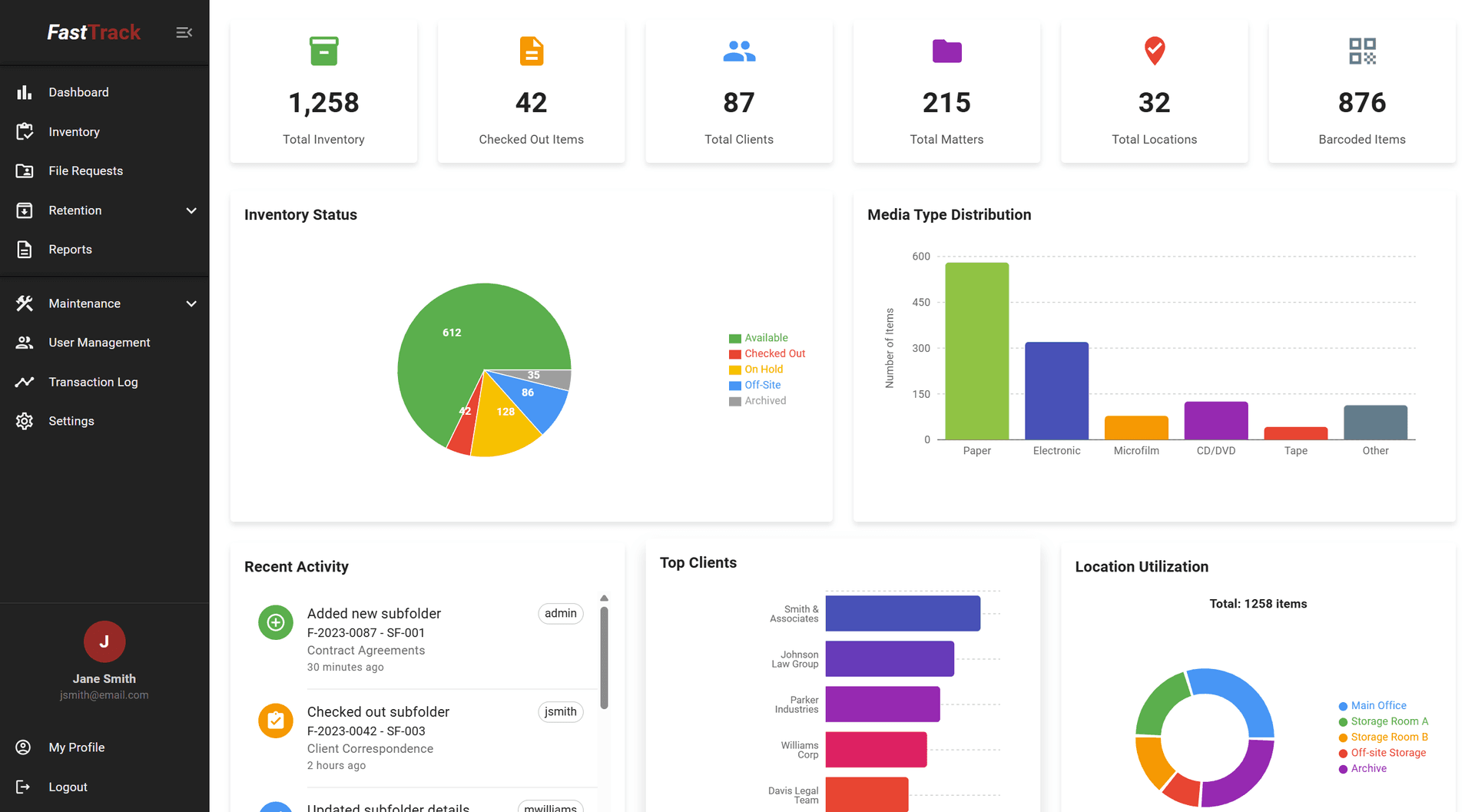
Spreadsheet retention tracking usually means entering dates by hand, sorting or filtering to find what's due for review, and keeping disposition notes in another column or another file entirely. FastTrack manages that within the records system itself.
As with any retention process: your firm defines its retention policies, and FastTrack helps apply, track, and manage them consistently. It does not determine the legally correct retention period for a record. See our records retention page for more detail.
Excel vs. FastTrack
A spreadsheet tells you what's on the list. A records-management system helps manage what happens to those records over time.
| Capability | Excel / Spreadsheet | FastTrack |
|---|---|---|
| Client & matter inventory | Possible | Purpose-built |
| Current physical location | Manual updates | Centrally tracked |
| File movement history | Difficult, usually manual | Maintained automatically through the workflow |
| Barcode scanning | Not built in | Supported |
| Retention dates | Manual | Managed within the records system |
| Legal holds | Manual process | Centrally tracked |
| Multiple users | Version/process dependent | Shared, centralized system |
| Off-site storage locations | Manual | Centrally maintained |
| Disposition history | Manual | Maintained in the record lifecycle |
| Audit / history | Limited | Structured records history |
Already Have Years of Records in Excel?
Switching doesn't mean starting from a blank inventory. Existing spreadsheets and file lists can typically be imported into FastTrack, and data-import assistance is included with a subscription.
Every firm's spreadsheet looks a little different, so we review the format and condition of your data with you before migration — we don't promise a perfect, automatic import for every file without that review.
Talk to Us About Your Existing Records DataIs This Worth Considering for Your Firm?
FastTrack may be worth a look if your firm:
- Maintains thousands of physical records
- Uses multiple spreadsheets to manage inventory
- Has files moving between employees or locations
- Stores records off-site
- Needs structured retention and disposition workflows
- Relies heavily on one person's knowledge of the spreadsheet
A firm with a handful of physical files and a simple spreadsheet may genuinely be fine as-is — this is worth evaluating when that stops being true, not before.
FAQ
Frequently Asked Questions
Is Excel suitable for law firm records management?+
For a small number of records, one location, and a single person maintaining it, a spreadsheet can work reasonably well. The limitations tend to show up as record volume, users, locations, and retention complexity increase.
When should a law firm move beyond spreadsheets?+
There's no fixed threshold, but common signs include: several people updating the same spreadsheet, files moving between staff or offices, multiple spreadsheets for different locations, retention dates that are hard to act on consistently, or one employee who's become the only person who really understands the system.
Can FastTrack import our existing Excel records?+
Yes. Existing file lists and spreadsheets can typically be imported into FastTrack rather than re-entered by hand, and data-import assistance is included with a subscription. We review your specific spreadsheet format with you before migration — not every column or naming convention maps over automatically without a look.
Do we have to re-enter all of our client and matter data?+
Generally, no. The goal of the import process is to bring your existing client, matter, and file data into FastTrack's structure rather than starting from a blank inventory.
Can FastTrack track physical file locations?+
Yes. Current location and movement history are core to FastTrack, updated through the same workflow staff already use to check files in and out, rather than a separate manual update step.
Does FastTrack replace our document-management system?+
Not necessarily. FastTrack focuses on the records-management lifecycle, including the physical records and retention processes that traditional document-management systems may not fully address. Many firms run FastTrack alongside an existing DMS.
Can FastTrack manage records across multiple offices?+
Yes. Multiple offices and storage locations are managed within one system, rather than a separate spreadsheet per location.
How much does FastTrack cost?+
FastTrack starts at $149 per month, with pricing that scales based on firm size, user count, and office complexity. No long-term contract is required.
See What Moving Beyond Spreadsheets Looks Like
A 30-minute demo covers your current spreadsheet setup and what importing it into FastTrack would involve.