Records Management Software for Law Firms
Law Firm Records Management Software
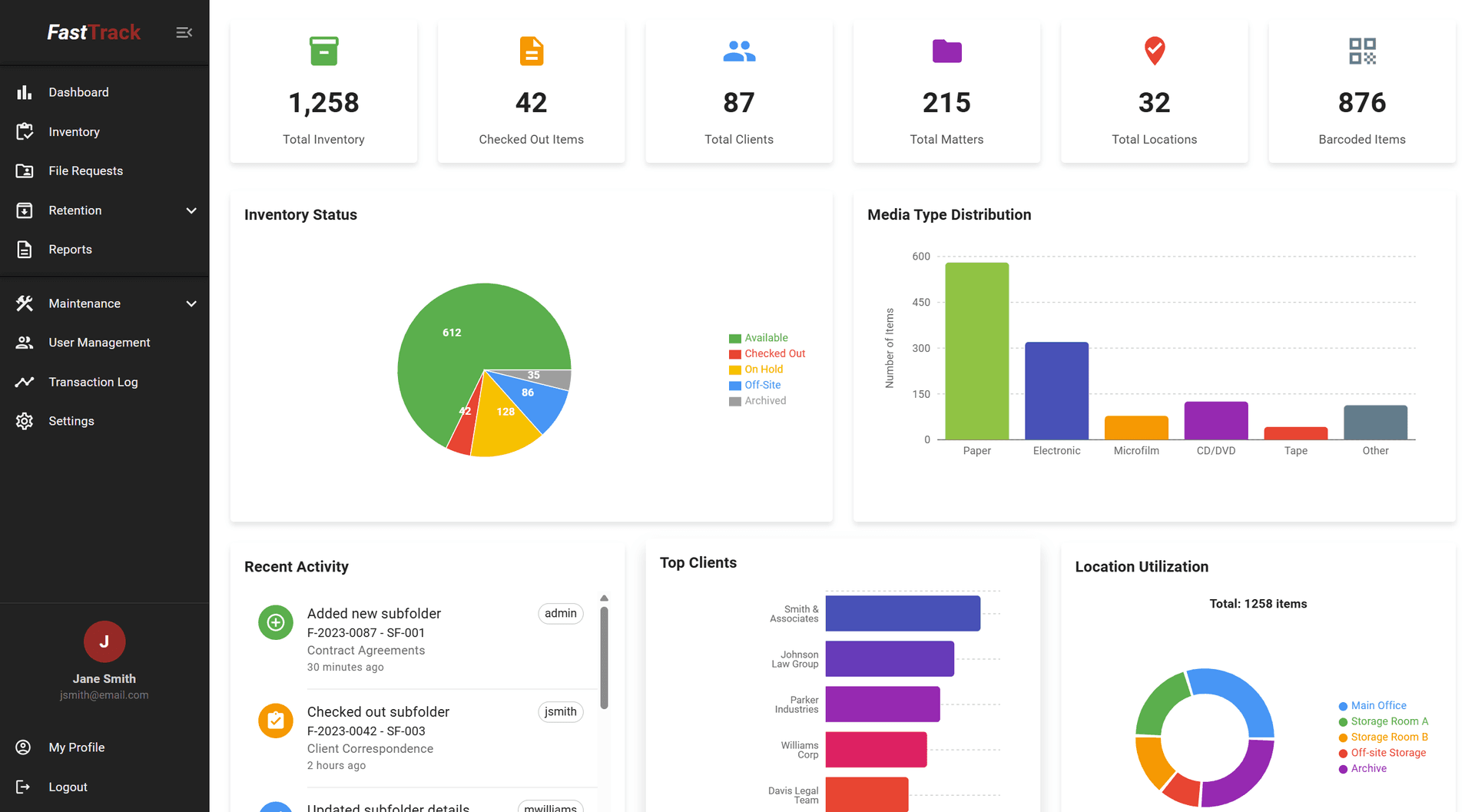
FastTrack helps law firms organize, track, retain, and manage physical and digital records throughout their lifecycle — from file creation through final disposition.
Trusted by Law Firms Since 1996





When Records Management Becomes a Daily Problem
Most firms don't set out to lose track of their records. It happens gradually, as volume grows.
Physical records spread across multiple offices and storage locations, with no single source of truth for where anything is
Spreadsheets and manual logs that work until several people need to update them at once
Uncertainty about who currently has a file, or where it was before that
Retention tracking that lives in someone's memory, or a separate spreadsheet disconnected from the actual files
No reliable way to identify which records are actually eligible for review or disposition
Physical files in one system and digital documents in another, so no single view shows the complete picture
Built Around the Way Law Firms Already Work
Client → Matter → Folder → Record
Instead of generic folders and file shares, FastTrack organizes every record around the structure legal professionals already use. Staff can locate a file, folder, or record by client and matter, without relying on naming conventions or institutional memory.
Within that structure, FastTrack tracks current physical location, movement history, retention status, and — where a record has one — an attached digital document, so a single view shows more of the complete picture for a file.
See All Features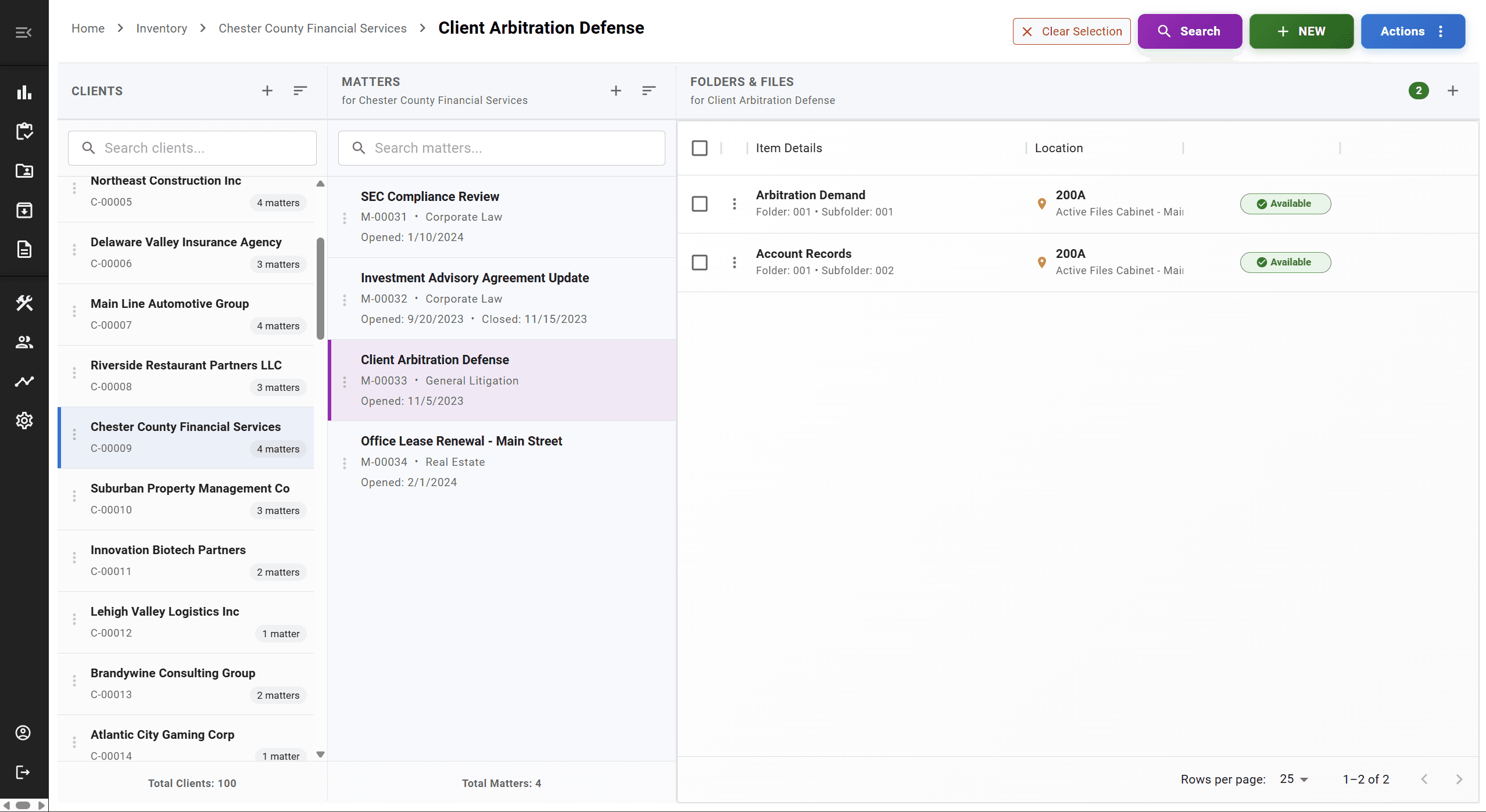
Records Management Is More Than Document Storage
A lot of software stores electronic documents well. Far less of it tracks what happens to a record over its full lifecycle — where the physical file has been, when it moved, whether it's under a legal hold, and when it's eligible for disposition.
FastTrack focuses on that lifecycle and physical-custody side of records management, so it can complement an existing document-management system rather than compete with it for the same job.
What FastTrack Centralizes
One system for the information that's otherwise scattered across spreadsheets, sign-out sheets, and separate tools
Client & Matter Records
Every file organized by client and matter, with folders and records beneath it
Physical Locations & Movement
Current location and a history of where a file has been and who had it
Retention & Disposition
Retention rules applied consistently, with disposition history preserved
Legal Holds
Hold records centrally to prevent premature destruction during litigation
Still managing this in spreadsheets? See how FastTrack compares on our Excel alternative page.
Explore FastTrack by Use Case
If one part of records management is your firm's most pressing problem, these pages go deeper
Serving Law Firms Since 1996
FastTrack was built by IT professionals who needed a better way to track records themselves, and has served law firms and legal departments for nearly three decades since. We're based in Philadelphia, PA, with clients nationwide.
FAQ
Frequently Asked Questions
What is law firm records-management software?+
Law firm records-management software is a system for organizing, locating, and governing a firm's records throughout their lifecycle — from the moment a client or matter file is created through its eventual review and disposition. That typically includes tracking physical file locations and movement, storing and linking related digital documents, and managing retention schedules and legal holds, all organized around clients and matters rather than generic folders.
How is records management different from document management?+
Document management systems are generally built to store, version, and search electronic documents. Records management extends further, into the records-lifecycle and physical-custody side: where a physical file currently is, who has it, when it moved, how long it needs to be retained, and when it becomes eligible for disposition. FastTrack focuses on the records-management lifecycle, including the physical records and retention processes that traditional document-management systems may not fully address.
Can FastTrack track physical files?+
Yes. Physical file tracking is a core part of FastTrack — barcode labels for files, folders, and boxes, current location tracking, and a movement history as files check in and out of the records room, offices, or off-site storage.
Can FastTrack work with an existing document-management system?+
In many cases, yes. Firms often use FastTrack alongside a document-management system that handles electronic documents, while FastTrack handles physical file inventory, location tracking, and the records-retention and disposition processes that sit outside a typical DMS. FastTrack also supports attaching digital documents directly to a matter for firms that want a more unified view.
Does FastTrack support records retention?+
Yes. Your firm defines its retention policies — by practice area, file type, or matter — and FastTrack helps apply, track, and manage them consistently, including flagging records approaching review, supporting legal holds, and maintaining a disposition history. FastTrack does not determine the legally correct retention period for a given record; that remains your firm's decision.
Can existing records data be imported?+
Yes. Existing file lists — from Excel, a legacy system, or your time-and-billing software — can typically be imported rather than re-entered by hand, and data-import assistance is included with a FastTrack subscription. The specifics depend on the format and condition of your existing data, which we review with you before migration.
How much does FastTrack cost?+
FastTrack starts at $149 per month for solo and small firms, with pricing that scales based on firm size, user count, and office complexity. There are no long-term contracts required. See the Pricing page for details, or schedule a demo for a quote specific to your firm.
How long does implementation take?+
Implementation time depends on your firm's size and how much existing data needs to be migrated. Setup, training, and data migration are included with your subscription, and our team works with you to plan a rollout — schedule a demo to talk through a timeline for your firm specifically.
See FastTrack Applied to Your Firm's Records
A 30-minute demo covers your firm's specific records-management challenges, not a generic walkthrough.