Retention & Disposition Management
Records Retention Software for Law Firms
Manage retention dates, legal holds, review workflows, and final disposition from one centralized records-management system.
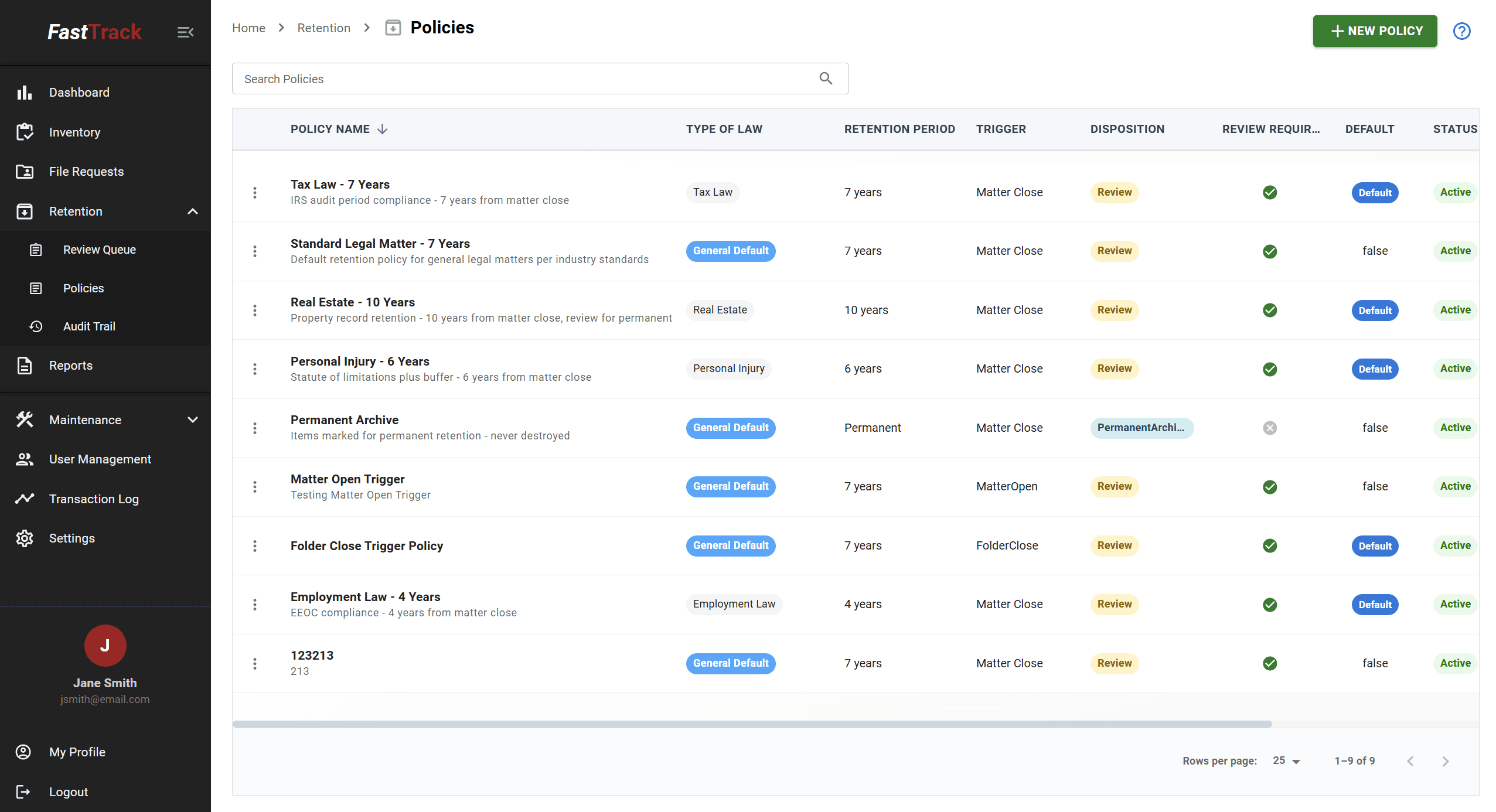
Your firm defines its retention policies. FastTrack helps apply, track, and manage them consistently — it does not determine the legally correct retention period for a particular record, and nothing on this page should be read as legal advice.
Know What You Have. Know How Long to Keep It. Know When It's Ready for Review.
Retention & Disposition Dates
Set per practice area, file type, or matter, and applied consistently across your inventory
Records Approaching Review
Surfaced for your team instead of requiring a manual spreadsheet sort
Legal Holds
Prevent destruction of held records regardless of retention date
Disposition History
A record of what was destroyed, when, and under what process

Why Records Pile Up Even When No One Wants Them To
Few firms decide to keep records indefinitely on purpose. It happens because no one has a reliable way to identify what's actually eligible for review, so records default to staying put.
A defined retention process — with dates that are tracked centrally rather than remembered — gives your firm a consistent way to review what it has and act on what it doesn't need to keep, on a schedule your firm controls.
FAQ
Frequently Asked Questions
What is records-retention software?+
Records-retention software helps a firm apply its retention policy consistently across its inventory — tracking retention and disposition dates, flagging records approaching review, managing legal holds, and preserving a record of what was destroyed and when.
Does FastTrack determine legal retention periods?+
No. Your firm defines its retention policies — how long different record types or practice areas need to be kept — based on your own legal and professional judgment. FastTrack helps apply, track, and manage those policies consistently once they're defined; it does not provide legal advice or determine the legally correct retention period for a particular record.
Can retention rules differ by practice area or record type?+
Yes. Retention rules can be set by practice area, file type, or matter, so a firm handling multiple types of work isn't forced into a single, one-size-fits-all schedule.
What happens when a record is placed on legal hold?+
A record on legal hold is flagged centrally to prevent it from being marked eligible for destruction while the hold is active, regardless of what its underlying retention date would otherwise suggest. Holds are tracked as part of the record itself, not in a separate list someone has to remember to check.
Can FastTrack identify records approaching disposition?+
Yes. Rather than requiring someone to manually sort and filter a spreadsheet by date, FastTrack surfaces records approaching their review or destruction date so your team can review them on a predictable schedule.
Does FastTrack maintain disposition history?+
Yes. When records are destroyed or otherwise dispositioned, that action is recorded as part of the record's history, giving your firm a reference for what was destroyed, when, and under what process.
Can FastTrack manage physical and digital records under the same retention process?+
Yes, where a physical file has an associated digital document attached to the same matter, both can be managed under the same retention structure rather than tracked through two disconnected processes.
Talk Through Your Firm's Retention Process
A 30-minute demo covers how retention rules, legal holds, and disposition tracking would work with your firm's existing policies.